Destination and dates
Where the client is going, when they arrive, and how many nights they have.
AI-assisted, agent-reviewed
Itiner helps travel agents, DMCs, and tour operators create a structured first draft, edit every day, apply agency branding, and deliver the approved trip through a live portal or PDF.
Always review AI output before sending it to a client.
Already drafting trips in ChatGPT? See Itiner vs ChatGPT.
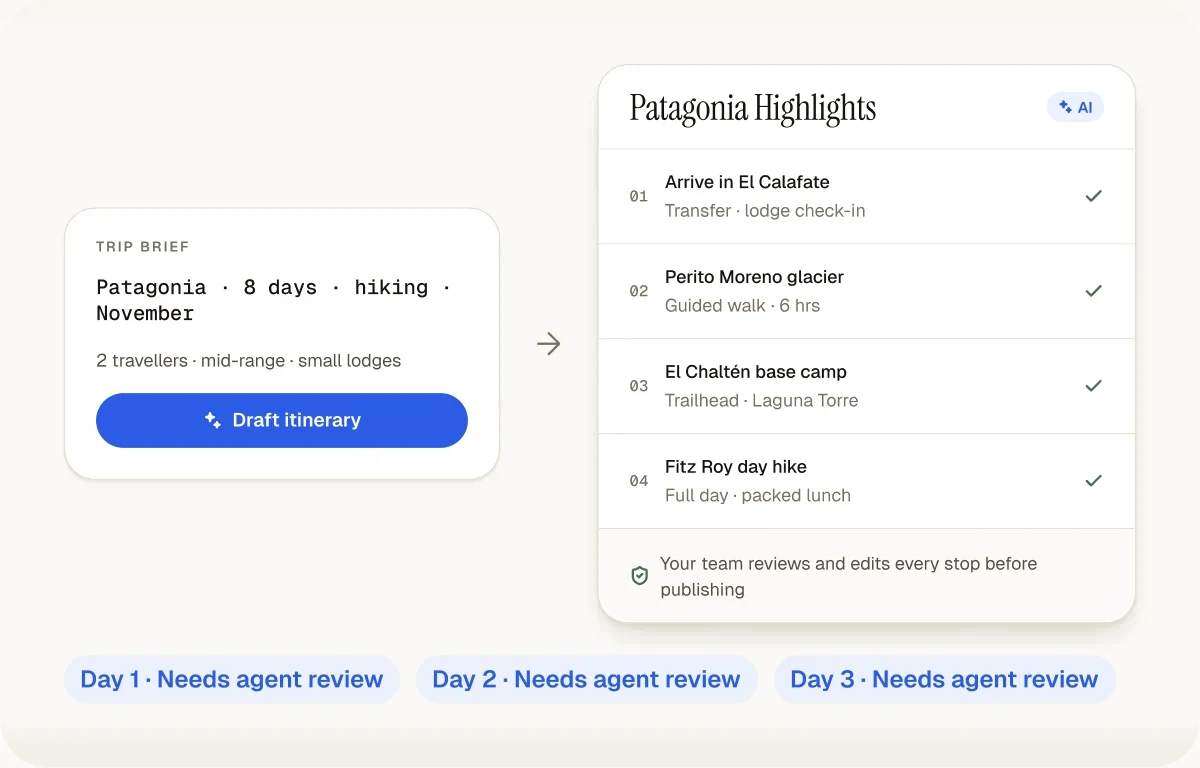
Better input, better starting point
The model does not know the client or the agency's operating constraints unless the brief says so. A specific request gives the agent a more useful first draft and makes missing information easier to spot. Check a brief against the categories below with the free itinerary brief grader before drafting.
Human review
A fast draft only helps if the final itinerary is accurate and useful. Keep review inside the workflow rather than treating generated text as finished travel advice.
Specialized workflow
Generic AI chat ends with text. An agency still needs to organize the days, keep a reusable source, apply branding, publish a client-friendly version, and update the itinerary after feedback. Itiner connects the draft to those next steps.
The itinerary remains an editable trip, not a response buried in chat history.
The same reviewed plan becomes a live client portal or branded PDF.
A strong itinerary can become a template the team adapts for another client.
Frequently asked questions
An AI itinerary builder turns a short trip brief into a structured, day-by-day draft: where the traveller is each day, what they do in the morning, afternoon and evening, and where they stay. A general chatbot can write that as text. A specialised builder like Itiner keeps it as structured data instead, so a travel professional can edit individual days, reorder stops, reuse the trip as a template, and deliver it as a branded client portal or PDF. For example, an agent enters "Bali, 6 days, honeymoon couple, premium, relaxed pace" and gets six planned days with real places in Ubud, Nusa Penida and Seminyak in a few minutes. The agent then checks every name, timing and price before the client sees it, because the AI produces a starting point, not an approved plan.
ChatGPT returns an itinerary as a block of chat text. To send it, an agent copies it into Word, Google Docs or Canva, reformats every day, and repeats that work whenever the client asks for a change. Itiner plans the trip from the agency's brief using real places for the destination, saves it as structured days and stops, and lets the team edit, reuse and publish it as a branded live portal or PDF from one source. The two also work together: Itiner connects to ChatGPT and Claude through MCP, so an agent can ask in chat ("make day 3 more relaxed") and the change is made to the real Itiner trip, not to a separate chat answer. Either way, the agent still reviews every detail before the client sees it.
No. Itiner uses AI to remove the blank-page step, which is the slowest and least valuable part of building an itinerary. What clients pay an agent for stays human: choosing suppliers the agent trusts, knowing which hotel suits a family with toddlers, checking that a ferry runs in monsoon, negotiating rates, and being reachable when a flight is cancelled. The AI draft has no access to live availability or the agency's own supplier rates, and it can be wrong about opening hours or travel times. Itiner is designed around that limit: every draft is editable, nothing reaches the client until the agent publishes it, and the portal shows the agency's branding and contact details, not Itiner's.
Include everything that would change the plan: destination and areas, dates or trip length, who is travelling (couple, family with ages, group size), budget level, pace (relaxed, balanced, packed), interests, fixed bookings such as flights or a hotel already confirmed, and anything to avoid, such as long drives or early starts. Compare "Plan a Bali trip" with "6 days in Bali, 10 to 15 November, honeymoon couple in their 30s, premium, relaxed, two nights each in Ubud, Nusa Penida and Seminyak, loves food and spas, no long drives." The second brief produces a draft that needs light editing instead of a rewrite. Itiner's free brief grader checks a pasted brief against the eight details a good draft needs before you generate.
Yes. The generated itinerary is a starting point. Agents can change activities, descriptions, times, notes, and day structure before the itinerary is sent to the client.
Yes. A reviewed itinerary can become a reusable team template, but it should be adapted to the new client rather than sent unchanged.
Publish a live client portal that opens in a browser or export a branded PDF. The portal gives the agency one current version to update when the plan changes.
Yes. The free plan includes a limited number of AI generations, and the public demo shows the workflow without requiring an account.
Yes. Itiner has a remote MCP connector for Claude, Claude Code, Cursor and VS Code, and for ChatGPT on supported paid plans. Once connected, you ask your AI app for a trip and it runs Itiner's own AI planner, so the draft is saved in your Itiner account as a structured, editable itinerary with real places, not loose chat text. You can then change a day or re-plan the trip in the same chat, review it in Itiner, and publish the client portal. Setup takes a few minutes at itiner.in/ai-assistants.
Keep reading
Start with a real client brief
Create a free account, generate a limited number of drafts, and judge the workflow by how much useful review-ready structure it gives your team.
Create Your First Itinerary free: a 14-day trial with Flex features, up to 15 trips, then the Free plan. No card needed.